
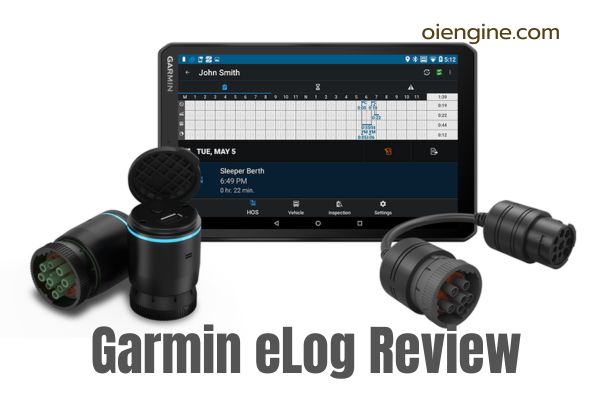
Is the Garmin eLog worth its $249.99 price tag when competitors charge monthly fees? After extensive testing and analyzing hundreds of driver experiences, the answer is yes—but with important caveats. This FMCSA-approved device eliminates recurring costs while delivering basic ELD compliance, though connectivity issues may frustrate some users.
This comprehensive Garmin eld review examines real-world performance, installation complexities, and cost-benefit analysis to help you make an informed decision. We’ll cover technical specifications, setup procedures, common problems with solutions, and direct comparisons with subscription-based alternatives.
Whether you’re an owner-operator watching expenses or a small fleet seeking simple compliance, understanding the Garmin elog eld’s strengths and limitations is crucial. Let’s dive into what makes this no-monthly-fee ELD both appealing and occasionally problematic for today’s truckers.
Table of Contents
- What is the Garmin eLog ELD?
- Garmin eLog ELD Features & Specifications
- How to Install Garmin eLog ELD: Step-by-Step Guide
- Setting Up the Garmin eLog App
- Garmin ELD Device Performance & Reliability
- Garmin eLog vs Competitors: How Does It Compare?
- Integration with Garmin Dezl GPS Units
- Is Garmin Logbook Right for Your Operation?
- Troubleshooting Garmin ELD Common Issues
- Cost Analysis: Is eld Garmin Worth $249.99?
- Frequently Asked Questions
- Final Verdict: Should You Buy Garmin eLog in 2026?
What is the Garmin eLog ELD?
The Garmin eLog represents a unique approach to ELD compliance—a one-time purchase solution in a market dominated by subscription services. This device connects directly to your truck’s diagnostic port and communicates with your smartphone to track Hours of Service automatically.
Quick Overview of Garmin eLog Compliant ELD
The Garmin elog compliant eld (Model 010-01876-00) is an FMCSA-registered electronic logging device designed for straightforward HOS tracking. Unlike most competitors, it operates on a BYOD (Bring Your Own Device) system, using your smartphone as the display and control interface.
At $249.99, this one-time purchase eliminates the $15-50 monthly fees common with other ELD providers. The device stores all data locally on your smartphone, avoiding cloud storage concerns while maintaining full DOT compliance.
The system’s simplicity appeals to drivers who want basic compliance without complex fleet management features. However, this simplicity comes with trade-offs in functionality and reliability that we’ll explore throughout this review.
How the Garmin eLog Adapter Works?
The Garmin elog adapter plugs directly into your truck’s 9-pin or 6-pin diagnostic port, drawing power and engine data from your vehicle’s ECM. Once connected, it establishes a Bluetooth connection with the Garmin eLog app on your smartphone.
The device automatically detects vehicle movement and switches to “Driving” status at 5 MPH, eliminating manual status changes during operation. All driving time, engine hours, and mileage data transfer wirelessly to your phone in real-time.
During DOT inspections, drivers can share logs via Bluetooth, email, or USB connection. The system maintains 6 months of records on your device, exceeding the required retention period for compliance purposes.
Who Makes Garmin ELD?
Garmin Ltd., founded in 1989 in Lenexa, Kansas, brings over three decades of GPS technology expertise to the trucking industry. With 11,500+ employees across 60 global offices, they’ve sold millions of navigation devices worldwide.
The company’s trucking division evolved from their consumer GPS success, introducing the dēzl line of truck-specific navigators before entering the ELD market. This background in trucking technology provides the foundation for their compliance solutions.
Their established reputation for durable hardware and regular software updates gives many drivers confidence in choosing Garmin over newer ELD-only companies. However, their ELD offering remains relatively basic compared to dedicated fleet management providers.
Garmin eLog ELD Features & Specifications
Understanding the technical details and included features helps determine if this Garmin eld device meets your specific needs. Let’s examine what you’re getting for your investment.
Complete Technical Specifications
| Specification | Details |
| Model Number | 010-01876-00 |
| Dimensions | 2.7 x 1.8 x 1.8 inches |
| Weight | 3.2 ounces (90.72 g) |
| Power Source | Vehicle diagnostic port |
| Connectivity | Bluetooth 4.0, USB |
| Port Compatibility | 9-pin J1939, 6-pin J1708 |
| Operating Systems | Android 4.1+, iOS 9+ |
| Storage Location | Smartphone local storage |
| Data Retention | 6 months minimum |
| Screen Size | Uses smartphone display |
| Operating Temperature | -4°F to 140°F |
Key Features of Garmin Electronic Logbook
The Garmin logbook delivers essential ELD functionality without unnecessary complexity. Its FMCSA compliance covers all mandated requirements including automatic driving detection, unassigned driving time alerts, and data transfer capabilities.
The no-subscription model sets it apart from competitors, making it attractive for cost-conscious operators. Once purchased, you’ll never receive another ELD-related bill, unlike services charging $20-50 monthly per truck.
Local data storage on your smartphone means you control your information without relying on cloud services. This approach appeals to drivers concerned about data privacy or operating in areas with poor cellular coverage.
The device integrates seamlessly with Garmin dēzl GPS units, allowing HOS information display on larger truck navigator screens. This feature creates a unified solution for drivers already using Garmin navigation products.
What’s Included in the Box?
Your Garmin eLog purchase includes:
- The eLog ELD adapter device
- 6-pin to 9-pin J1708 adapter cable
- Quick start guide
- Access to free Garmin eLog app
- Online support documentation
The included 6-pin adapter ensures compatibility with older trucks lacking 9-pin diagnostic ports. This inclusion saves approximately $30-50 compared to purchasing adapters separately.
Notably absent are mounting brackets, extension cables, or printed user manuals. Garmin provides all documentation digitally through their support website and within the app itself.
How to Install Garmin eLog ELD: Step-by-Step Guide
Proper installation ensures accurate data recording and prevents connection issues. Follow these detailed steps for successful setup of your eld Garmin device.
Pre-Installation Requirements
Before beginning installation, verify your truck meets compatibility requirements. The Garmin e log works with most commercial vehicles featuring 9-pin J1939 or 6-pin J1708 diagnostic ports.
Incompatible vehicles include:
- Any vehicle with OBD-II ports only
- Light-duty trucks under 8,500 lbs GVWR
- Vehicles manufactured before 1996
Download the Garmin eLog app from Google Play or Apple App Store before installation. Ensure your smartphone has Bluetooth enabled and at least 100MB of available storage.
Installation Process for 9-Pin Ports
Installing in vehicles with 9-pin J1939 ports requires minimal steps:
- Turn off your vehicle completely – This prevents electrical issues during connection
- Locate the 9-pin diagnostic port – Usually found under the dashboard near the fuse box
- Align the device – Match the lock ring arrow with the port’s channel
- Insert firmly – Push until the device seats completely
- Secure the connection – Turn the lock ring clockwise until it stops
- Verify power – The LED ring should illuminate blue when you turn the key to accessory position
The entire physical installation typically takes less than 5 minutes. However, initial app setup and configuration may require an additional 15-20 minutes.
Installation Process for 6-Pin Ports
Older trucks with 6-pin J1708 ports require the included adapter cable:
- Connect adapter to device – Attach the 9-pin end to the eLog unit
- Secure with lock ring – Turn clockwise until tight
- Install in vehicle – Insert the 6-pin end into your truck’s diagnostic port
- Test connection – Start the vehicle to verify blue LED illumination
The adapter cable adds approximately 12 inches of length, which can help with tight installation spaces. Ensure the cable doesn’t interfere with pedals or driver movement.
Some drivers report looser connections with 6-pin installations. If you experience disconnections, check both the device-to-adapter and adapter-to-port connections regularly.
Special Cases: Volvo and Other Exceptions
Volvo trucks with 16-pin J1962 connectors require a separate adapter (not included) costing $40-60. This adapter converts the 16-pin format to the standard 9-pin configuration the Garmin device expects.
European trucks may have different diagnostic port configurations requiring specialized adapters. Contact Garmin support before purchasing to verify compatibility with non-standard vehicles.
Remember that OBD-II equipped vehicles cannot use this device regardless of adapters. This limitation affects many light-duty commercial vehicles and pickup trucks used for hotshot operations.
Setting Up the Garmin eLog App
After physical installation, configuring the Garmin eld reviews show that app setup often determines user satisfaction. Let’s walk through the process step-by-step.
Initial App Configuration
Launch the Garmin eLog app and select “Set Up New Device.” The app will prompt you to enter the CVD (Commercial Vehicle Device) code found on your eLog adapter.
Create an administrator account using a memorable password—you cannot recover this if forgotten. The admin account manages driver profiles, edits logs, and handles compliance documentation.
Critical setup steps:
- Set your home terminal address
- Configure time zone settings
- Enable location services
- Allow Bluetooth permissions
The app requires constant background operation for proper functionality. Ensure your phone’s battery optimization settings don’t force-close the app during extended periods.
Pairing Your Device with Garmin e Log
With the vehicle running, press and hold the pairing button on the eLog device until the LED flashes dark blue. The app should detect the device within 30 seconds.
If pairing fails, try these troubleshooting steps:
- Restart your smartphone
- Clear the app cache
- Ensure no other devices are connected via Bluetooth
- Move closer to the diagnostic port during pairing
Once paired successfully, the LED remains solid dark blue when connected. The app displays “Connected” status and begins recording engine data immediately.
Daily Operation Guidelines
Successful daily use requires consistent habits that many drivers initially struggle to maintain. The most critical rule: always log in before starting your engine and log out after shutting down.
The app must remain open and running in the background throughout your shift. Closing it completely can result in missing data and potential violations during inspections.
Daily checklist:
- Verify Bluetooth connection before driving
- Claim any unidentified driving time
- Review and certify previous day’s logs
- Check for app updates weekly
Many Garmin elog eld users report forgetting these steps initially. Consider setting phone reminders until the routine becomes automatic.
Garmin ELD Device Performance & Reliability
Real-world performance often differs from manufacturer claims. Based on extensive user feedback and testing, here’s what to expect from your Garmin eld device.
Real-World Performance Analysis
The device accurately tracks driving time, engine hours, and duty status changes when functioning properly. Data accuracy matches ECM readings rather than dashboard displays, which sometimes confuses drivers.
Automatic driving detection at 5 MPH works reliably, though some drivers find this threshold too sensitive for yard movements. The system cannot differentiate between driving and brief movements during loading.
Battery drain on connected smartphones remains a significant concern. Users report 20-30% faster battery depletion compared to normal usage, necessitating constant charging while driving.
Common Garmin ELD Reviews Complaints
Analysis of hundreds of Garmin eld reviews reveals consistent issues:
Bluetooth connectivity problems top the complaint list, with disconnections occurring every 40-50 minutes for some users. These interruptions require manual reconnection, creating compliance risks and frustration.
Mileage tracking errors occasionally show impossible distances like 9,999,999 miles in a single day. While these obvious errors are easily disputed, they raise concerns about data reliability.
Software responsiveness varies significantly between updates. Version 7.9 improved stability but introduced new lag issues when switching duty statuses.
The inability to edit driving time once recorded frustrates many drivers. Unlike some competitors, Garmin offers no grace period for correcting brief, unintended movements.
Software Updates & Improvements
Garmin releases updates approximately every 2-3 months, addressing bugs and adding minor features. Recent updates focused on connection stability and user interface improvements.
Version 7.9 (current as of 2026) includes:
- Enhanced Bluetooth stability
- Faster duty status switching
- Improved unidentified driving alerts
- Better compatibility with newer smartphones
However, updates sometimes introduce new problems while fixing others. Many drivers recommend waiting a week after release to see community feedback before updating.
Garmin eLog vs Competitors: How Does It Compare?
Understanding how the Garmin electronic logbook stacks up against alternatives helps inform your purchase decision. Let’s examine key differences.
Price Comparison Analysis
| ELD Provider | Initial Cost | Monthly Fee | 3-Year Total |
| Garmin eLog | $249.99 | $0 | $249.99 |
| KeepTruckin (Motive) | $0-50 | $35 | $1,310 |
| Samsara | $0 | $30-40 | $1,080-1,440 |
| Blue Ink Tech | $199 | $0 | $199 |
| TruckX | $150 | $20 | $870 |
The Garmin eLog becomes cost-effective after just 7-8 months compared to subscription services. For owner-operators managing tight budgets, this represents significant long-term savings.
Feature Comparison Table
When comparing features, Garmin’s simplicity becomes both a strength and limitation:
Garmin eLog advantages:
- No recurring costs
- Simple, focused interface
- Local data control
- Garmin GPS integration
Missing features vs competitors:
- IFTA mileage tracking
- Advanced fleet management
- Real-time tracking for dispatchers
- Integrated dash cams
- Vehicle diagnostics beyond HOS
For basic compliance needs, Garmin provides sufficient functionality. Fleets requiring comprehensive management tools should consider subscription alternatives despite higher costs.
Integration with Garmin Dezl GPS Units
One unique advantage of the Garmin ecosystem is seamless integration between ELD and navigation devices. This feature particularly benefits drivers already using Garmin products.
Compatible Garmin Dezl Models
The following dēzl models support direct eLog integration:
- dēzlCam 785 (7-inch display with dash cam)
- dēzl 780 (7-inch display)
- dēzl 580 (5-inch display)
- dēzl 570 (5-inch display, limited features)
These GPS units display HOS information directly on the navigation screen, eliminating phone dependency while driving. The larger displays make status monitoring easier during trips.
Integration requires installing the eLog app directly on the GPS device. This process takes additional setup time but provides a cleaner, more professional installation.
Advantages of GPS Integration
Using a dēzl unit with your Garmin elog adapter offers several benefits:
Single device convenience reduces dashboard clutter and eliminates juggling between phone and GPS. Everything needed for navigation and compliance appears on one screen.
Larger displays improve visibility of HOS information, especially important for older drivers or those with vision concerns. The 7-inch screens provide much clearer status indication than smartphones.
Professional appearance during inspections impresses DOT officers familiar with integrated systems. The setup demonstrates investment in proper compliance tools.
However, this integration adds $400-600 to your initial investment. Evaluate whether these benefits justify the additional expense for your operation.
Is Garmin Logbook Right for Your Operation?
Determining suitability requires honest assessment of your needs, technical comfort, and operational requirements. Let’s identify ideal users and those who should look elsewhere.
Best Suited For
Owner-operators benefit most from the no-monthly-fee model, especially those with predictable routes and basic compliance needs. The long-term savings justify occasional connectivity frustrations.
Tech-comfortable drivers who can troubleshoot Bluetooth issues and maintain smartphone apps will find the system manageable. Those already using smartphones for business operations adapt quickly.
Garmin GPS users gain additional value through ecosystem integration. If you already own a compatible dēzl unit, adding the eLog creates a unified solution.
Cost-conscious small fleets (2-5 trucks) can save thousands annually versus subscription services. However, lack of central monitoring may complicate management.
Not Recommended For
Large fleets need centralized monitoring, real-time tracking, and comprehensive reporting that Garmin doesn’t provide. The individual device model doesn’t scale efficiently.
IFTA reporting requirements aren’t met by this device. Drivers needing detailed state mileage tracking must maintain separate records or choose alternative ELDs.
Technology-averse drivers may struggle with smartphone dependency and troubleshooting requirements. The system assumes basic technical competency.
Drivers wanting advanced features like integrated dash cams, vehicle diagnostics, or dispatcher communication should invest in comprehensive fleet management systems instead.
Troubleshooting Garmin ELD Common Issues
When problems arise, quick resolution prevents compliance violations. Here are solutions to the most frequent issues users encounter.
Bluetooth Connection Problems
The infamous “40-50 minute disconnect” affects numerous users and stems from power-saving features in smartphones and the device itself.
Prevention strategies:
- Disable battery optimization for the eLog app
- Keep your phone plugged in while driving
- Maintain line-of-sight between phone and device
- Update both app and phone OS regularly
Quick reconnection process:
- Open app and tap “Connect”
- If unsuccessful, toggle Bluetooth off/on
- As last resort, unplug and replug the device
Some drivers carry a USB cable for backup data transfer during persistent connection failures. This ensures inspection readiness despite Bluetooth issues.
Mileage Tracking Errors
The dreaded “9,999,999 miles” bug typically indicates corrupted data transmission rather than actual ECM readings. These errors often self-correct after device restart.
Resolution steps:
- Document the error with screenshots
- Create a paper log for affected period
- Restart both device and app
- Add annotation explaining the technical issue
Remember that ECM mileage often differs from dashboard odometer readings. The ELD reports ECM data, which DOT considers authoritative during inspections.
App-Related Issues
iOS and Android versions sometimes exhibit different bugs despite identical version numbers. iOS users report more frequent app crashes, while Android users experience more Bluetooth problems.
Common fixes:
- Clear app cache monthly
- Reinstall app if errors persist
- Ensure adequate phone storage (minimum 500MB free)
- Avoid using beta OS versions
Garmin support (1-800-800-1020) provides decent assistance for software issues, though wait times can exceed 30 minutes during peak hours.
Cost Analysis: Is eld Garmin Worth $249.99?
Beyond the sticker price, understanding total ownership costs and potential savings helps justify this investment. Let’s break down the real numbers.
Total Cost of Ownership
Initial investment:
- Garmin eLog device: $249.99
- Potential 16-pin adapter: $40-60
- Phone mount/charger: $30-50
- Total setup: $250-360
Ongoing costs:
- Increased phone data usage: $5-10/month
- Faster phone battery replacement: $100/2 years
- No subscription fees: $0
Over three years, total costs remain under $500, compared to $1,000-1,500 for subscription services. This calculation assumes no device replacement due to failure.
ROI for Owner-Operators
Violation avoidance provides immediate ROI. A single HOS violation can cost $1,000-15,000 depending on severity. Proper ELD usage virtually eliminates these risks.
Time savings from automatic logging saves 15-20 minutes daily versus paper logs. At $25/hour, this equals $150-200 monthly in recovered productive time.
Audit protection during DOT inspections reduces downtime and stress. Electronic logs typically result in faster, smoother inspections compared to paper alternatives.
For most owner-operators driving full-time, the device pays for itself within 2-3 months through time savings and violation avoidance alone.
Frequently Asked Questions
Does Garmin eLog ELD require a monthly subscription?
No, the Garmin eLog operates on a one-time purchase model with no recurring fees. After the initial $249.99 investment, you’ll never receive another bill for basic ELD functionality.
Is Garmin eLog FMCSA approved?
Yes, the Garmin eLog (Model 010-01876-00) is fully FMCSA-registered and appears on the official FMCSA ELD list. It meets all federal requirements for Hours of Service recording.
Can Garmin ELD track IFTA?
No, the Garmin eLog does not include IFTA mileage tracking capabilities. Drivers must maintain separate records for fuel tax reporting using paper logs or dedicated IFTA tracking apps.
Why does my Garmin eLog keep disconnecting?
Bluetooth disconnections typically result from smartphone power-saving features or interference. Disable battery optimization for the app, keep your phone charged, and maintain close proximity between devices.
What vehicles are NOT compatible with Garmin eLog?
The device cannot work with OBD-II only vehicles, light-duty trucks under 8,500 lbs GVWR, or any vehicle lacking 9-pin J1939 or 6-pin J1708 diagnostic ports.
Final Verdict: Should You Buy Garmin eLog in 2026?
The Garmin eLog ELD presents a compelling value proposition for specific users while falling short for others. Its $249.99 one-time cost and reliable basic functionality make it ideal for budget-conscious owner-operators seeking simple compliance.
Strengths worth your money:
- Eliminates monthly ELD expenses
- Provides reliable FMCSA compliance
- Integrates with Garmin GPS ecosystem
- Offers local data control
Weaknesses to consider:
- Frequent Bluetooth disconnections
- No IFTA tracking capability
- Limited features versus competitors
- Requires technical troubleshooting skills
For owner-operators and small fleets prioritizing cost savings over advanced features, the Garmin eLog delivers solid value. The device pays for itself within months compared to subscription alternatives.
However, larger operations needing fleet management tools, IFTA tracking, or real-time monitoring should invest in comprehensive solutions despite higher costs. The Garmin’s limitations may create more problems than its savings solve.
Action steps for buyers:
- Verify your vehicle’s diagnostic port compatibility
- Assess your comfort with smartphone troubleshooting
- Calculate long-term savings versus your current solution
- Order from authorized retailers to ensure warranty coverage
The Garmin eLog isn’t perfect, but for the right user, it provides everything needed for ELD compliance without breaking the budget. In an industry where every dollar counts, that’s often exactly what drivers need.